
One office. One inventory.
A customer asks for a 5 marla plot in Block C. You have three — one in a WhatsApp chat, one in the register, one on a colleague's phone — and the customer leaves before you find them. MartGeo keeps your office inventory in one place, searchable on a map or list. Free, no commission.
The five biggest problems of a property office — and how MartGeo solves them.
Inventory is not in one place.
Different colleagues hold different plots, houses, rentals and blocks. The customer is with one colleague, while the plot he needs is on another colleague's phone.
MartGeo: MartGeo brings the whole office's inventory into one shared place that every team member can see and search.
You repeat your inventory again and again.
You keep telling dealer friends: this plot in A block, this one in B, this one in C; these rental options, these houses.
MartGeo: Put your MartGeo QR code up in the office. A dealer friend scans it and sees your office's latest inventory himself.
Plot number and location live in different places.
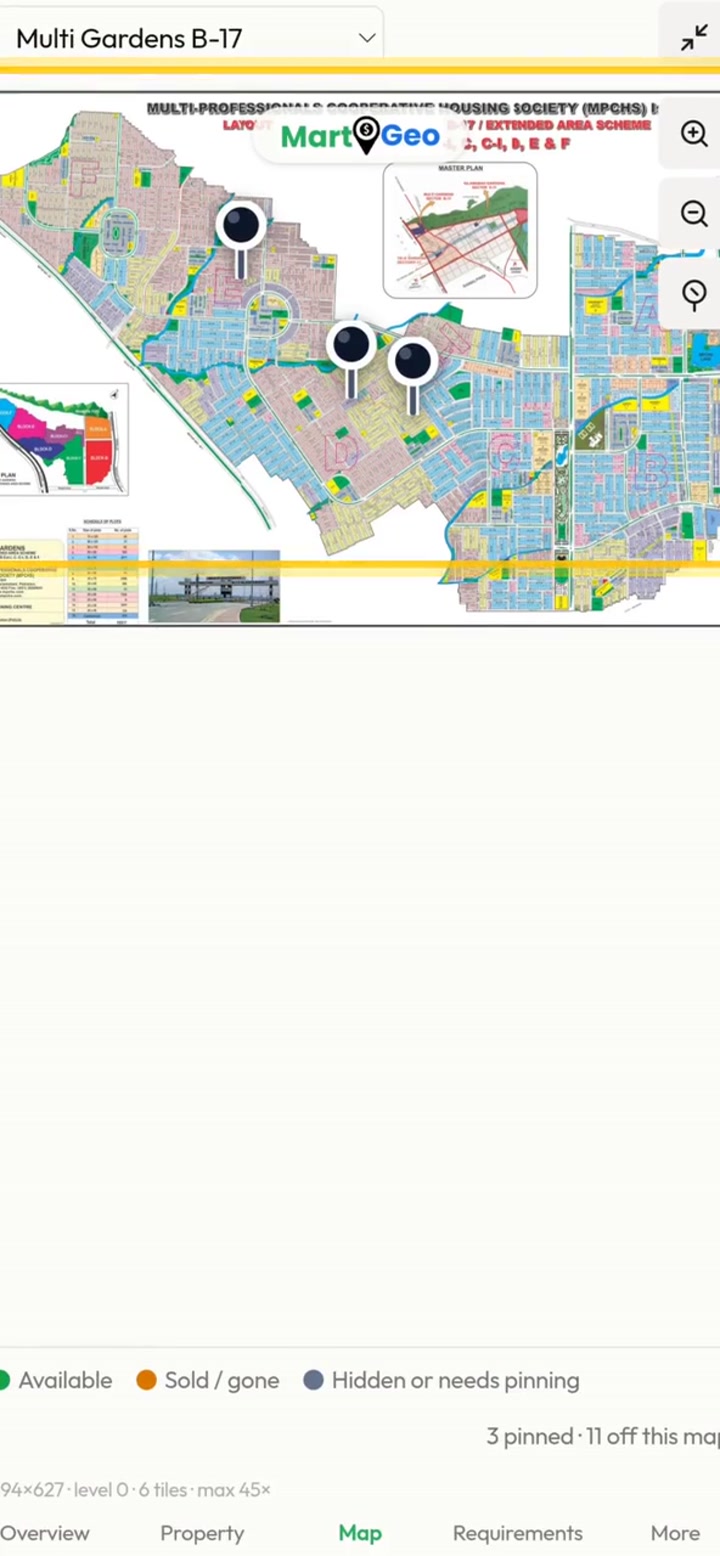
The plot is in your inventory, but to check its location you open the society map and search for it. When a customer comes, you do it all again.
MartGeo: Pin your inventory on the map in MartGeo. All your plots appear as pins at a glance — no more opening the map again and again.
Inventory gets lost in WhatsApp.
Property messages arrive on WhatsApp and get lost among thousands of messages. You keep a register, but when you are out without it, you don't know what inventory the office has.
MartGeo: Copy the message from WhatsApp and paste it into MartGeo. The system pulls out the details and builds a digital inventory register you can open from anywhere.
Available property never reaches the customer.
A good plot is with the office, but the right customer or another dealer doesn't know about it.
MartGeo: Any property kept public can be found on MartGeo, and an interested customer or dealer contacts the listing dealer directly.
Teach the system your society names.
The same society can be written in several ways. Multi Gardens B-17, for example, may appear as B-17, B/17, Multi B17, Multi or MPCHS. Save each society and its common abbreviations so the system can recognise those names in pasted messages. Check the extracted details before saving.
Everything your office gets
Several colleagues join one system and see one shared inventory.
Copy a plot message from WhatsApp and paste it into MartGeo. No retyping.
MartGeo pulls society, block, size, demand and other details out of the message.
Check every extracted detail and correct mistakes before saving.
An organised digital inventory replaces WhatsApp chats and the paper register.
Find any saved plot again with a search.
Filter by block, size, society and other details.
See new and old inventory separately, so you know how fresh each entry is.
Every authorised colleague adds inventory; the team sees one shared record.
You decide which plots are public and which stay inside the office.
Public properties can be seen by customers searching on MartGeo.
Other dealers can see public inventory and contact you.
An interested customer or dealer contacts the listing dealer directly.
Share a link to one plot.
Share one link to your whole public inventory.
Every office gets its own profile page and link.
A customer scans your office QR code and sees your current public inventory.
Customers search and filter listed properties by what they need.
Free. Always. No commission.
Creating and using your account is free and always will be. There is no commission on your deals.
Common questions
All seller questionsCan I add property from a WhatsApp message?
Yes. Paste the message, check the extracted information and save it.
Can I see properties on a map?
Yes. Your inventory can be viewed on a map or as a list.
Can my team use the inventory?
Yes. Team accounts support a shared office inventory.
Does MartGeo charge commission on a deal?
No. MartGeo does not take a commission on your deals.
Stop losing deals to scattered listings.
Create your free account and start organising your office inventory.